
Use tags
Tags work best when a save belongs to more than one idea at the same time.
Use tags for labels like:
to readresearchweekendclient athanksgiving
Don’t feel obliged to tag everything: search covers the full text of your articles, so an untagged save is never lost. Tags are for the groupings you actually come back to.
Add tags while saving
Section titled “Add tags while saving”Both the Add Link dialog and the browser extension have a tag field:
- Start saving a link.
- Type a tag and press Enter, comma, or Tab to add it. Tags you already use are suggested as you type. Pick one with the arrow keys.
- Save the link.
Add or change tags later
Section titled “Add or change tags later”- Open the save’s ⋯ options menu and choose Edit Tags.
- Add or remove tags.
- Save your changes.
To retag a whole batch at once, select multiple saves and use Add Tags in the bulk actions bar.
How Bredbox handles tags
Section titled “How Bredbox handles tags”Bredbox tidies tags as you type them, so small formatting differences don’t fragment your library:
- Tags are stored in lowercase with extra spaces removed:
Read Laterandread laterare the same tag. - Tags can contain letters, numbers, and spaces.
- A single save can carry up to 10 tags, each up to 100 characters.
Find everything with the same tag
Section titled “Find everything with the same tag”Open Tags in the sidebar to see every tag in your library, then open one to see all of its saves.
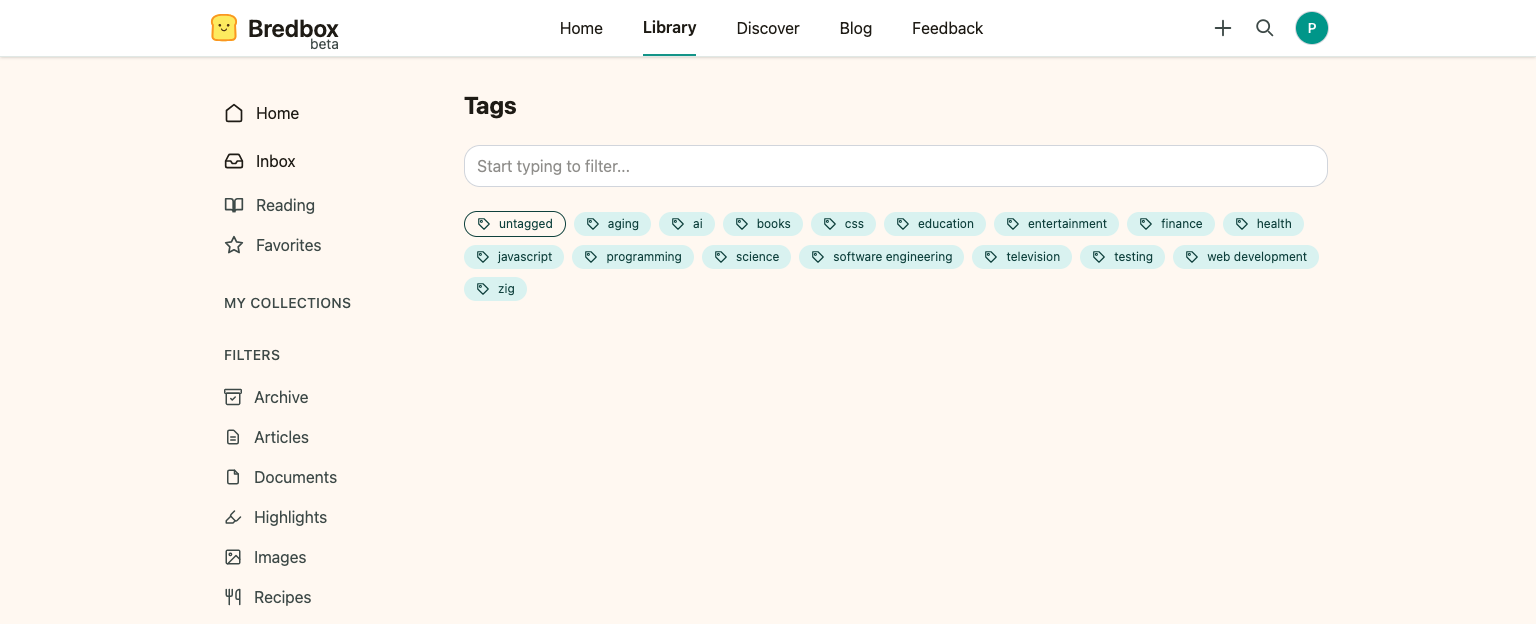
This is ideal for questions like:
- What have I saved for this project?
- Which recipes have I already collected?
See what has no tags yet
Section titled “See what has no tags yet”At the front of the tag list sits an untagged pill. Open it to see every save with no tags at all, newest first, as a regular list: it pages and bulk-selects like any other view.
Untagged is where a tagging session starts. Work through the list, adding tags to the saves worth grouping; the moment a save gains its first tag it leaves the list, so the list itself is your progress. To label a whole batch at once, select several saves and use Add Tags in the bulk actions bar.
There’s no need to empty it. A save with no tags is still fully searchable, so Untagged is a to-do list only if you want one.
Rename a tag
Section titled “Rename a tag”Tag names are easy to change later, so a tag you named in a hurry doesn’t have to stay that way. The controls sit next to the title on a tag’s own page:
- Open Tags in the sidebar and choose the tag.
- Click Rename tag (the pencil next to the tag name).
- Type the new name and click Rename.
The new name replaces the old one everywhere at once, including on saves in Archive and Trash. Renaming a tag never changes the saves themselves.
Merge two tags
Section titled “Merge two tags”Merging happens through renaming: give a tag the name of a tag you already use, and Bredbox offers to combine them.
- Rename the tag as above, typing the name of the existing tag you want to merge into.
- Bredbox tells you the name already exists and how many saves will move.
- Click Merge tags to confirm.
Saves that already carried both tags keep a single copy. This is the fix for the duplicates that creep in over time: recipe and recipes, or ml and machine learning.
Delete a tag
Section titled “Delete a tag”- Open the tag.
- Click Delete tag (the trash icon next to the tag name).
- Confirm with Delete.
Deleting a tag removes that label from every save that carried it, including saves in Archive and Trash. Your saves are not deleted, and their other tags are untouched. Only the label goes away.
Pin a tag to the sidebar
Section titled “Pin a tag to the sidebar”A tag you open constantly doesn’t need to be looked up every time. Click Pin tag (the pin next to the tag name) and it appears under Tags in the sidebar on every page. See Pin the tags and collections you use most.
Tags or collections?
Section titled “Tags or collections?”Use this rule of thumb:
| If you need… | Use… |
|---|---|
| One save to appear in multiple groups | Tags |
| A single home for a focused set of saves | Collections |
Quick status labels like later or urgent |
Tags |
| Notes and manual ordering | Collections |
For project work, most people use both: a collection for the project and tags for status. More on the other half in Use collections.