Download, print, and share
What you save in Bredbox isn’t locked in Bredbox. Any article, recipe, or saved email can leave as a file or a printout, and an article or recipe can go to a friend as a link.
Download an article
Section titled “Download an article”- Open the article or recipe in the reading view.
- Click Download in the toolbar.
- Pick a format:
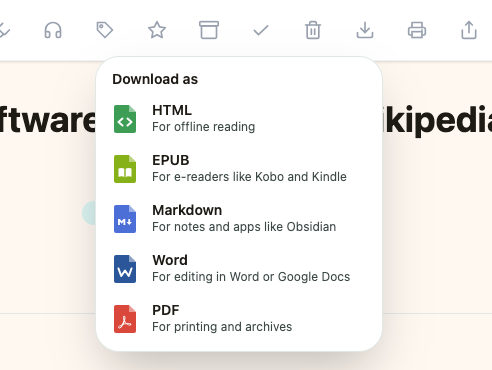
- HTML: for offline reading in any browser.
- EPUB: a real e-book, for e-readers and reading apps. Open it in Kobo, Apple Books, or Calibre, or mail it to your Kindle with Send to Kindle. The book’s details carry the article’s title, authors, tags, description, and the address it came from, so your reading app files it properly. Like the Word download, it leaves the pictures out.
- Markdown: for your notes and apps like Obsidian. The file starts with the save’s details: title, source, authors, tags, reading status, and the date you saved it, so it drops neatly into a notes vault.
- Word: a
.docxfor editing in Microsoft Word, Google Docs, Pages, or LibreOffice. Headings, lists, quotes, tables, and links all come through as real Word formatting, and the article’s title, author, and tags are filled in as document properties. Pictures are left out, so what you get is the words. - PDF: for printing and archives.
For your whole library at once, use Export your data instead.
Download a saved PDF or document
Section titled “Download a saved PDF or document”A PDF works differently, because Bredbox keeps the real file. Open it and click Download to get Original PDF, the exact document Bredbox retrieved, byte for byte, still yours even if the page it came from disappears. There are no HTML, EPUB, Markdown, or Word versions of a PDF: the viewer already shows you the document itself, so any conversion would only be a worse copy of what you have.
A saved Word document or presentation offers two downloads: the original file in its own format (Original DOCX, Original PPTX, and so on) and a PDF of it, whose pages match the ones you highlighted. See Read saved PDFs and documents.
Download a saved email
Section titled “Download a saved email”A saved email offers the two documents Bredbox holds for it, both HTML:
- Open the email and click Download in the toolbar.
- Pick which one you want:
- HTML: the readable version you see in the reader, in the same clean layout an article downloads as. It carries the subject, who the message came from, and the day it arrived.
- Original HTML: the message exactly as it arrived, with the sender’s own layout. The same thing View original shows, saved as a file.
Both are .html files, so the original is filed with (original) after the subject — the two sit side by side in your Downloads folder without one replacing the other.
There are no EPUB, Markdown, or Word versions of an email. Those formats convert prose, and a newsletter is a laid-out document that happens to have a readable version; for a PDF of either one, print it and choose Save as PDF.
Download an image
Section titled “Download an image”- Open the image save. Download is in the toolbar whenever Bredbox holds a copy of the picture itself.
- Click Download.
- Pick a format:
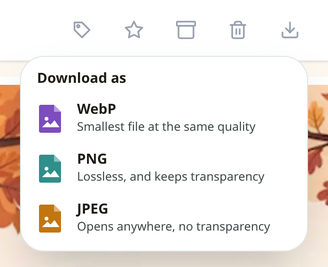
- WebP: the smallest file at the same quality.
- PNG: lossless, and keeps transparency.
- JPEG: opens anywhere, but has no transparency, so anything see-through comes out white.
Converting happens on your own device. The picture is never uploaded anywhere to be reformatted, and picking the format it is already in saves Bredbox’s copy untouched instead of re-encoding it, so nothing is lost by choosing it.
An animated GIF or an SVG gets a fourth choice at the top of the menu, named after the format it is in, that hands the file over exactly as saved. The three above can’t reproduce either one: an animation would flatten to a single frame, and an SVG would become fixed-size pixels.
Very large pictures can be more than a browser will convert. Bredbox tells you instead of saving a blank image. Take the stored format in that case.
Print an article, recipe, email, or document
Section titled “Print an article, recipe, email, or document”Click Print in the reader toolbar (or press P) and Bredbox opens a print-friendly version, the clean article or recipe view, formatted for paper. Recipes print like proper recipe cards.
An email prints its readable version, headed by the subject, the sender, and the day it arrived. That is the version worth putting on paper: a message’s own layout is built for a mail app’s window, and columns sized for a screen do not fit a page.
A PDF, Word document, or presentation prints its own pages, laid out exactly as they appear in the viewer.
Share a save
Section titled “Share a save”- Click Share in the reader toolbar.
- Copy URL puts the link on your clipboard, and the button flips to “Copied!” so you know it worked.
- Or add a short note and share straight to Facebook, X, LinkedIn, Reddit, or Bluesky.
Sharing sends the original page’s link, so the person you share with doesn’t need Bredbox.